Overview
Ubuntu で RAID 1 上に LVM の構成を構築する。
本記事では sdb と sdc の 2 Disk で RAID 1 と RAID 上に LVM を構成する方法と手順を記載する。
Storage Diagram
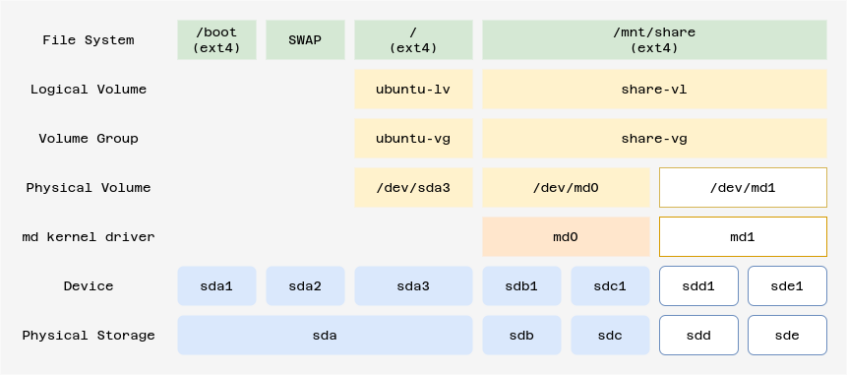
Requirement
- OS (ubuntu) は RAID 対象外
- 初期の RAID 構成は sdb と sdc の 2 Disk で RAID 1 構成とする
- sdd と sde の 2 Disk は 初期構成した RIAD 1 の Storage 容量が不測した場合に追加するものとする
Reference
Environment
root@nas:~# uname -a
Linux nas 5.15.0-58-generic #64-Ubuntu SMP Thu Jan 5 11:43:13 UTC 2023 x86_64 x86_64 x86_64 GNU/Linux
root@nas:~# cat /etc/os-release
PRETTY_NAME="Ubuntu 22.04.1 LTS"
NAME="Ubuntu"
VERSION_ID="22.04"
VERSION="22.04.1 LTS (Jammy Jellyfish)"
VERSION_CODENAME=jammy
ID=ubuntu
ID_LIKE=debian
HOME_URL="https://www.ubuntu.com/"
SUPPORT_URL="https://help.ubuntu.com/"
BUG_REPORT_URL="https://bugs.launchpad.net/ubuntu/"
PRIVACY_POLICY_URL="https://www.ubuntu.com/legal/terms-and-policies/privacy-policy"
UBUNTU_CODENAME=jammy
root@nas:~#
Procedure Summary
RAID
- Partition
- md
LVM
- PV Create
- VG Create
- LV Create
- Create Mount Point
- Mount
- mdadm.conf
- initramfs update
- fstab
- reboot and check
RAID [ Partition ]
fdisk で追加する HDD[sdb , sdc] を確認
root@nas:~# ls -la /dev/sd[bc]
brw-rw---- 1 root disk 8, 16 Jan 23 12:30 /dev/sdb
brw-rw---- 1 root disk 8, 32 Jan 23 12:30 /dev/sdc
root@nas:~#
root@nas:~# fdisk -l
Disk /dev/loop0: 46.96 MiB, 49242112 bytes, 96176 sectors
Units: sectors of 1 * 512 = 512 bytes
Sector size (logical/physical): 512 bytes / 512 bytes
I/O size (minimum/optimal): 512 bytes / 512 bytes


Disk /dev/loop1: 61.96 MiB, 64970752 bytes, 126896 sectors
Units: sectors of 1 * 512 = 512 bytes
Sector size (logical/physical): 512 bytes / 512 bytes
I/O size (minimum/optimal): 512 bytes / 512 bytes


Disk /dev/loop2: 79.95 MiB, 83832832 bytes, 163736 sectors
Units: sectors of 1 * 512 = 512 bytes
Sector size (logical/physical): 512 bytes / 512 bytes
I/O size (minimum/optimal): 512 bytes / 512 bytes


Disk /dev/sda: 10 GiB, 10737418240 bytes, 20971520 sectors
Disk model: VBOX HARDDISK
Units: sectors of 1 * 512 = 512 bytes
Sector size (logical/physical): 512 bytes / 512 bytes
I/O size (minimum/optimal): 512 bytes / 512 bytes
Disklabel type: gpt
Disk identifier: FA6120DA-07AF-4E7F-BAFD-B3F929BBFFCF

Device       Start      End  Sectors  Size Type
/dev/sda1     2048     4095     2048    1M BIOS boot
/dev/sda2     4096  3674111  3670016  1.8G Linux filesystem
/dev/sda3  3674112 20969471 17295360  8.2G Linux filesystem


Disk /dev/mapper/ubuntu--vg-ubuntu--lv: 8.25 GiB, 8854175744 bytes, 17293312 sectors
Units: sectors of 1 * 512 = 512 bytes
Sector size (logical/physical): 512 bytes / 512 bytes
I/O size (minimum/optimal): 512 bytes / 512 bytes


Disk /dev/sdb: 10 GiB, 10737418240 bytes, 20971520 sectors
Disk model: HARDDISK
Units: sectors of 1 * 512 = 512 bytes
Sector size (logical/physical): 512 bytes / 512 bytes
I/O size (minimum/optimal): 512 bytes / 512 bytes


Disk /dev/sdc: 10 GiB, 10737418240 bytes, 20971520 sectors
Disk model: HARDDISK
Units: sectors of 1 * 512 = 512 bytes
Sector size (logical/physical): 512 bytes / 512 bytes
I/O size (minimum/optimal): 512 bytes / 512 bytes
root@nas:~#
Partitionの作成
sdb partition
root@nas:~# parted /dev/sdb
GNU Parted 3.4
Using /dev/sdb
Welcome to GNU Parted! Type 'help' to view a list of commands.
(parted) unit GB
(parted) mklabel gpt
(parted) mkpart primary
File system type?  [ext2]? ext4
Start? 0%
End? 100%
(parted) set 1 raid on
(parted) p
Model: VBOX HARDDISK (scsi)
Disk /dev/sdb: 10.7GB
Sector size (logical/physical): 512B/512B
Partition Table: gpt
Disk Flags:

Number  Start   End     Size    File system  Name     Flags
 1      0.00GB  10.7GB  10.7GB  ext4         primary  raid

(parted) quit
Information: You may need to update /etc/fstab.

root@nas:~#
sdc partition
root@nas:~# parted /dev/sdc
GNU Parted 3.4
Using /dev/sdc
Welcome to GNU Parted! Type 'help' to view a list of commands.
(parted) unit GB
(parted) mklabel gpt
(parted) mkpart primary
File system type?  [ext2]? ext4
Start? 0%
End? 100%
(parted) set 1 raid on
(parted) p
Model: VBOX HARDDISK (scsi)
Disk /dev/sdc: 10.7GB
Sector size (logical/physical): 512B/512B
Partition Table: gpt
Disk Flags:

Number  Start   End     Size    File system  Name     Flags
 1      0.00GB  10.7GB  10.7GB  ext4         primary  raid

(parted) quit
Information: You may need to update /etc/fstab.

root@nas:~#
Raid [ array ]
# ls -l /dev/sd[bc]*
brw-rw---- 1 root disk 8, 16 Jan 18 12:56 /dev/sdb
brw-rw---- 1 root disk 8, 17 Jan 18 12:55 /dev/sdb1
brw-rw---- 1 root disk 8, 32 Jan 18 12:56 /dev/sdc
brw-rw---- 1 root disk 8, 33 Jan 18 12:55 /dev/sdc1
# mdadm --create /dev/md0 --level=raid1 --raid-devices=2 /dev/sdb1 /dev/sdc1
mdadm: Note: this array has metadata at the start and
may not be suitable as a boot device. If you plan to
store '/boot' on this device please ensure that
your boot-loader understands md/v1.x metadata, or use
--metadata=0.90
Continue creating array? y
mdadm: Defaulting to version 1.2 metadata
mdadm: array /dev/md0 started.
#
# cat /proc/mdstat
Personalities : [linear] [multipath] [raid0] [raid1] [raid6] [raid5] [raid4] [raid10]
md0 : active raid1 sdc1[1] sdb1[0]
10474496 blocks super 1.2 [2/2] [UU]

unused devices:
#
# mdadm --misc --detail /dev/md0
/dev/md0:
           Version : 1.2
     Creation Time : Wed Jan 18 17:18:49 2023
        Raid Level : raid1
        Array Size : 10474496 (9.99 GiB 10.73 GB)
     Used Dev Size : 10474496 (9.99 GiB 10.73 GB)
      Raid Devices : 2
     Total Devices : 2
       Persistence : Superblock is persistent

       Update Time : Wed Jan 18 17:29:53 2023
             State : clean
    Active Devices : 2
   Working Devices : 2
    Failed Devices : 0
     Spare Devices : 0

Consistency Policy : resync

              Name : grav:0  (local to host grav)
              UUID : e36e3967:88231965:fe5416d2:f964bfd5
            Events : 17

    Number   Major   Minor   RaidDevice State
       0       8       17        0      active sync   /dev/sdb1
       1       8       33        1      active sync   /dev/sdc1
#
LVM [ physical volume ]
# pvcreate /dev/md0
 Physical volume "/dev/md0" successfully created.
LVM [ volume group ]
# vgcreate share_vg /dev/md0
 Volume group "share_vg" successfully created
LVM [ logical volume ]
# lvcreate -l 100%FREE -n share_lv share_vg
 Logical volume "share_lv" created.
File System
# mkfs -t ext4 /dev/share_vg/share_lv
mke2fs 1.46.5 (30-Dec-2021)
Creating filesystem with 2618368 4k blocks and 655360 inodes
Filesystem UUID: 5c214910-661d-4c8a-9a44-369a98331d35
Superblock backups stored on blocks:
	32768, 98304, 163840, 229376, 294912, 819200, 884736, 1605632

Allocating group tables: done
Writing inode tables: done
Creating journal (16384 blocks): done
Writing superblocks and filesystem accounting information: done
#
mount point
# mkdir /mnt/share
# ls -l /mnt
total 4
drwxr-xr-x 2 root root 4096 Jan 29 01:11 share
#
mount
# mount /dev/mapper/share_vg-share_lv /mnt/share
# df -h
Filesystem Size Used Avail Use% Mounted on
tmpfs 198M 1.1M 197M 1% /run
/dev/mapper/ubuntu--vg-ubuntu--lv 8.1G 4.3G 3.4G 57% /
tmpfs 988M 0 988M 0% /dev/shm
tmpfs 5.0M 0 5.0M 0% /run/lock
/dev/sda2 1.7G 127M 1.5G 8% /boot
tmpfs 198M 4.0K 198M 1% /run/user/1000
/dev/mapper/share_vg-share_lv 9.8G 24K 9.3G 1% /mnt/share
#
mdadm.conf
# mdadm --detail --scan >> /etc/mdadm/mdadm.conf
# vim /etc/mdadm/mdadm.conf
ARRAY /dev/md0 UUID=30758c0c:c1186a6d:1e167485:d68b11d9
initramfs update
# update-initramfs -u
update-initramfs: Generating /boot/initrd.img-5.15.0-58-generic
# cat /proc/mdstat
Personalities : [raid1] [linear] [multipath] [raid0] [raid6] [raid5] [raid4] [raid10]
md127 : active raid1 sdc1[1] sdb1[0]
10474496 blocks super 1.2 [2/2] [UU]

unused devices: <none>
#
fstab
# vim /etc/fstab
/dev/mapper/share_vg-share_lv /mnt/share ext4 defaults 0 0
reboot and check
# reboot
# cat /proc/mdstat
Personalities : [raid1] [linear] [multipath] [raid0] [raid6] [raid5] [raid4] [raid10]
md0 : active raid1 sdc1[1] sdb1[0]
10474496 blocks super 1.2 [2/2] [UU]

unused devices: <none>
#
# ls -l /dev/md*
brw-rw---- 1 root disk 9, 0 Jan 29 01:25 /dev/md0
#
# df -h
Filesystem Size Used Avail Use% Mounted on
tmpfs 198M 1.1M 197M 1% /run
/dev/mapper/ubuntu--vg-ubuntu--lv 8.1G 4.3G 3.4G 57% /
tmpfs 988M 0 988M 0% /dev/shm
tmpfs 5.0M 0 5.0M 0% /run/lock
/dev/mapper/share_vg-share_lv 9.8G 24K 9.3G 1% /mnt/share
/dev/sda2 1.7G 127M 1.5G 8% /boot
tmpfs 198M 4.0K 198M 1% /run/user/1000
#