Overview
TrueNAS Scale の GUI の設定項目について確認する。
Reference
- none
Environment
TrueNAS Scale 23.10.0.1
GUI Settings
System Settings>General>GUI
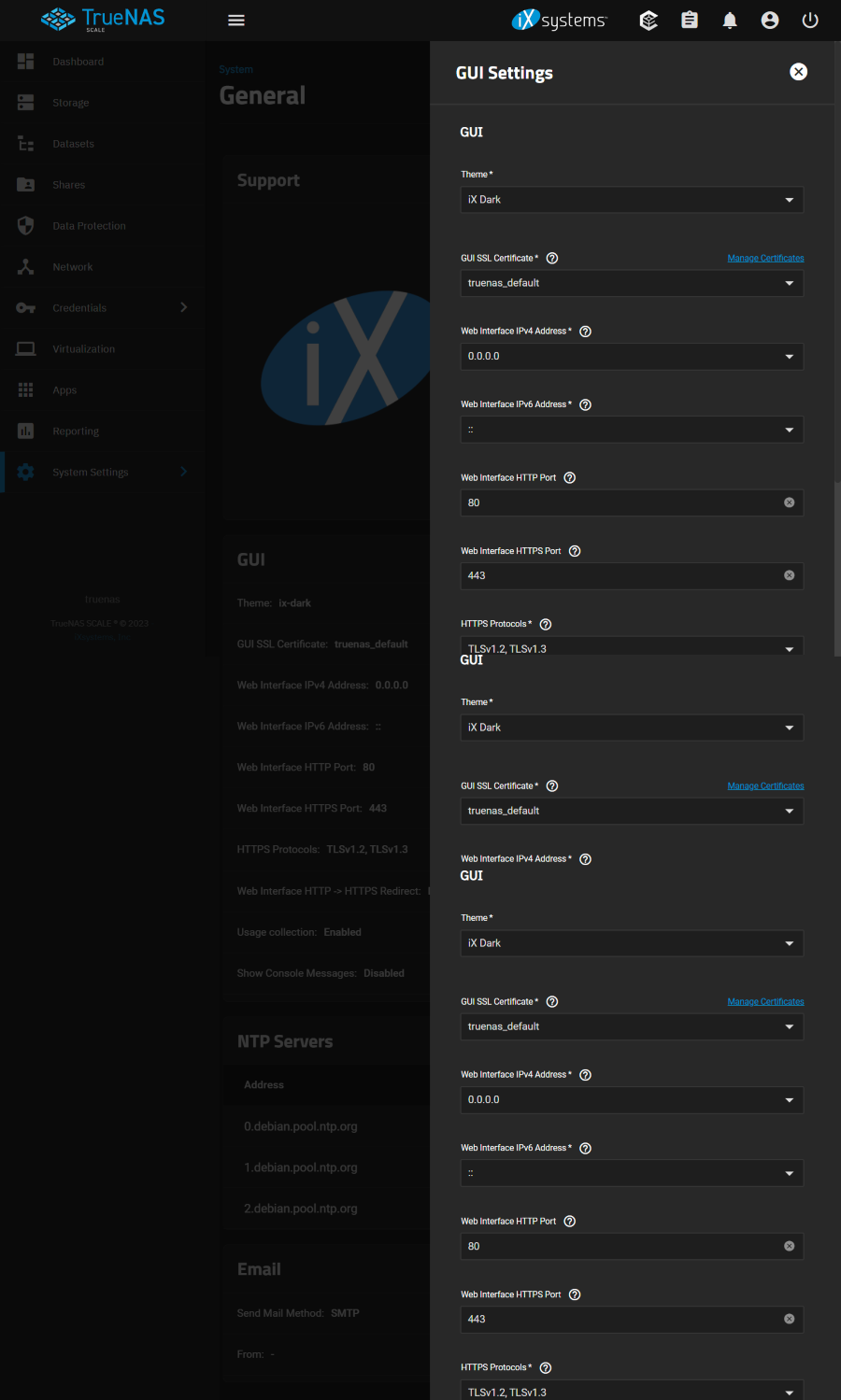
GUI
Theme
- iX Dark
- iX Blue
- Dracula
- Nord
- Paper
- Solarized Dark
- Midnight
- High Contrast
GUI SSL Certificate
The system uses a self-signed certificate to enable encrypted web interface connections. To change the default certificate, select a different certificate that was created or imported in the Certificates menu.
- truenas_default
Web Interface IPv4 Address
Choose a recent IP address to limit the usage when accessing the administrative GUI. The built-in HTTP server binds to the wildcard address of 0.0.0.0 (any address) and issues an alert if the specified address becomes unavailable.
- 0.0.0.0
Web Interface IPv6 Address
- ::
Web Interface HTTP Port
- 80 / default
Web Interface HTTPS Port
- 443 / default
HTTPS Protocols
- TLS1.2,TLS1.3 / default
Web Interface HTTP -> HTTPS Redirect
Redirect HTTP connections to HTTPS. A GUI SSL Certificate is required for HTTPS. Activating this also sets the HTTP Strict Transport Security (HSTS) maximum age to 31536000 seconds (one year). This means that after a browser connects to the web interface for the first time, the browser continues to use HTTPS and renews this setting every year.
- Unchecked / default >> Checked
Other Options
Usage collection
Enable sending anonymous usage statistics to iXsystems.
- checked / default >> unchecked
Show Console Messages
Display console messages in real time at the bottom of the browser.
- unchecked / default
Localization Settings
Localization
Language
- English (en) / default
Console Keyboard Map
- English (US)(us) / default >> Japanese (jp)
Timezone
- America/Los_Angeles / default >> Asia/Tokyo
Date Format
- 2023-12-14 / default
Time Format
- 00:00:00 (24 Hours) / default
NTP Servers
NTP Server Settings
Address
- 192.168.1.10
- Uncheced / default
iBurst
- Checked / default
Min Poll
- 6 / default
Max Poll
- 10 / default
Force
- unchecked / default
Email Options
Send Mail Method
- SMTP / default
- GMail OAuth
From Email
From Name
Outgoing Mail Server
Mail Server Port
- 25 / default
Security
- Plain (No Encryption)
- SSL (Implicit TLS)
- TLS (STARTTLS)
SMTP Authentication
- Unchecked / default