Overview
TrueNAS Scale の Dataset の設定項目について確認する。
Reference
Environment
TrueNAS Scale 23.10.0.1
Add Dataset
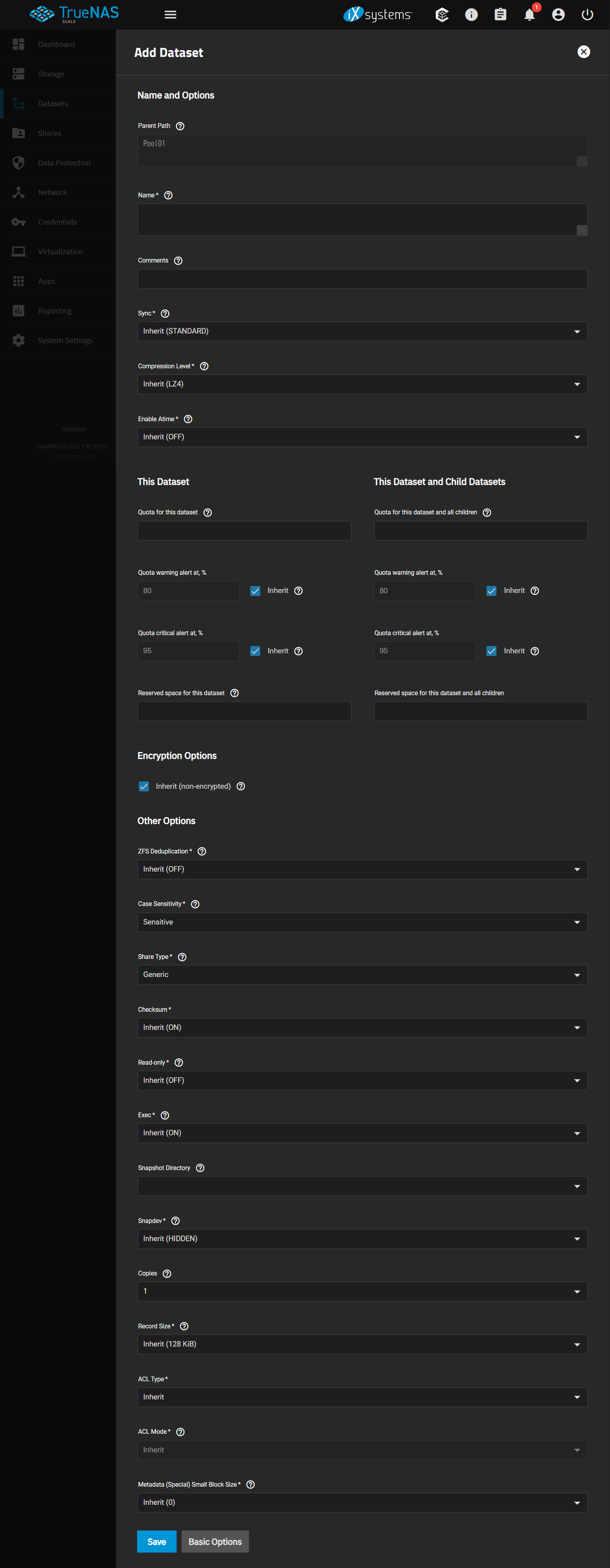
Configuration Items
Name and Options
Parent Path : [親のPathでPool名または親Dataset名]
Name : Dataset名称
Comments : コメント
Sync : HDDへの書き込み完了まで待機するか否かの設定
Standard uses the sync settings that have been requested by the client software, Always waits for data writes to complete, and Disabled never waits for writes to complete.
- Inherit(STANDARD)
- Standard
- Always
- Disabled
Compression Level : データの圧縮レベル
Encode information in less space than the original data occupies. It is recommended to choose a compression algorithm that balances disk performance with the amount of saved space.
LZ4 is generally recommended as it maximizes performance and dynamically identifies the best files to compress.
GZIP options range from 1 for least compression, best performance, through 9 for maximum compression with greatest performance impact.
ZLE is a fast algorithm that only eliminates runs of zeroes.
- Inherit(LZ4)
- OFF
- LZ4
- GZIP
- GZIP-1
- GZIP-9
- ZSTD
- ZSTD-FAST
- ZLE
- LZJB
- ZSTD-[1-19]
- ZSTD-FAST-[1-10/20/30/40/50/60/70/80/90/100/500/1000]
Enable Atime : ファイル読み込み時のログを生成するか否かの設定
Choose ON to update the access time for files when they are read. Choose Off to prevent producing log traffic when reading files. This can result in significant performance gains.
- Inherit(OFF)
- On
- Off
This Dataset
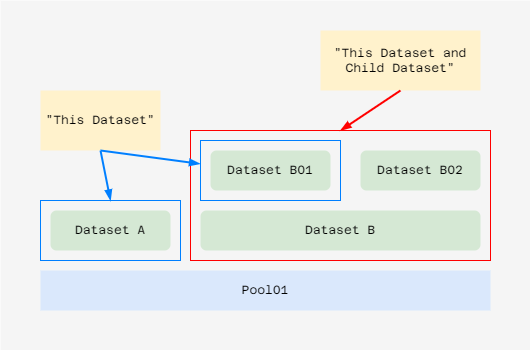
Quota for this dataset : Datasetのquota(≒書き込み可能容量)のサイズ
0 disables quotas. Specify a maximum allowed space for this dataset.
Quota warning alert at, % : Quotaの設定値に対してWarning Alertを生成する閾値(%)
Apply the same quota warning alert settings as the parent dataset.
- [80:default]
- Inherit[Check]
Quota critical alert at, % : Quotaの設定値に対してCritical Alertを生成する閾値(%)
Apply the same quota critical alert settings as the parent dataset.
- [95:default]
- Inherit[Check]
Reserved space for this dataset : 利用可能な空きスペースをこのDatasetに程度割り当てる容量
0 is unlimited. Reserve additional space for datasets containing logs which could take up all available free space.
This Dataset and Child Datasets
Quota for this dataset and all children
Define a maximum size for both the dataset and any child datasets. Enter 0 to remove the quota.
Quota warning alert at, %
0=Disabled, blank=inherit
- [80:default]
- Inherit[Check]
Quota critical alert at, %
0=Disabled, blank=inherit
- [95:default]
- Inherit[Check]
Reserved space for this dataset and all children
Encryption Options
Inherit (non-encrypted)[Check]
Use the encryption properties of the root dataset.
Encryption
Secure data within this dataset. Data is unusable until unlocked with an encryption key or passphrase.
Encryption Type
How the dataset is secured. Choose between securing with an encryption Key or a user-defined Passphrase. Creating a new key file invalidates any previously downloaded key file for this dataset. Delete any previous key file backups and back up the new key file.
- Key
- Passphrase
Generate Key
Randomly generate an encryption key for securing this dataset. Disabling requires manually defining the encryption key.
WARNING: the encryption key is the only means to decrypt the information stored in this dataset. Store the encryption key in a secure location.
Algorithm
Mathematical instruction sets that determine how plaintext is converted into ciphertext. See Advanced Encryption Standard (AES) for more details.
- AES-128-CCM
- AES-192-CCM
- AES-256-CCM
- AES-128-GCM
- AES-192-GCM
- AES-256-GCM / default
Other Options
ZFS Deduplication : ZFSの重複排除機能の利用の可否(「利用しない」がdefault)
Transparently reuse a single copy of duplicated data to save space. Deduplication can improve storage capacity, but is RAM intensive. Compressing data is generally recommended before using deduplication. Deduplicating data is a one-way process. Deduplicated data cannot be undeduplicated!.
- Inherit(OFF)
- On
- Off
- Verify
Case Sensitivity : 大文字と小文字が区別をするか否かの設定
Sensitive assumes filenames are case sensitive. Insensitive assumes filenames are not case sensitive.
- Sensitive
- Insensitive
Share Type
Choose the type that matches the type of client accessing the pool/dataset.
- Generic
- Case Sensitivity is Sensitive/大文字と小文字を区別する
- SMB
- ACL Mode to Restricted and Case Sensitivity to Insensitive
- Client が Windows メインの場合はSMBを選択
- Apps
- Multiprotocol
Checksum
- Inherit(ON)
- ON
- FLETCHR2
- FLETCHR4
- SHA256
- SHA512
- SKEIN
- EDONR
Read-only : Dataset を読み取り専用にするか否かの設定
Set to prevent the dataset from being modified.
- Inherit(OFF)
- On
- Off
Exec : データセット内からプロセスを実行できるかどうかを設定
Set whether processes can be executed from within this dataset.
- Inherit(OFF)
- On
- Off
Snapshot Directory
Choose if the .zfs snapshot directory is Visible or Invisible on this dataset.
Snapdev
Controls whether the volume snapshot devices under /dev/zvol/⟨pool⟩ are hidden or visible. The default value is hidden.
- Inherit(HIDDEN)
- Visible
- Hidden
Copies
Set the number of data copies on this dataset.
- [1-3]
Record Size
Matching the fixed size of data, as in a database, may result in better performance.
- Inherit(128 KiB)
- 512
- 512B
- 1K
- 2K
- 4K
- 8K
- 16K
- 32K
- 64K
- 128K
- 256K
- 512K
- 1M
- 2M
- 4M
- 8M
- 16M
ACL Type
- Inherit
- Off
- SMB/NFSv4
- POSIX / default
ACL Mode
Determine how chmod behaves when adjusting file ACLs. See the zfs(8) aclmode property.
Passthrough only updates ACL entries that are related to the file or directory mode.
Restricted does not allow chmod to make changes to files or directories with a non-trivial ACL. An ACL is trivial if it can be fully expressed as a file mode without losing any access rules. Setting the ACL Mode to Restricted is typically used to optimize a dataset for SMB sharing, but can require further optimizations. For example, configuring an rsync task with this dataset could require adding –no-perms in the task Auxiliary Parameters field.
- Passthrough
- Discard
Metadata (Special) Small Block Size
This value represents the threshold block size for including small file blocks into the special allocation class. Blocks smaller than or equal to this value will be assigned to the special allocation class while greater blocks will be assigned to the regular class. Valid values are zero or a power of two from 512B up to 1M. The default size is 0 which means no small file blocks will be allocated in the special class. Before setting this property, a special class vdev must be added to the pool. See zpool(8) for more details on the special allocation
- Inherit(0)
- 0
- 512B
- 1K
- 2K
- 4K
- 8K
- 16K
- 32K
- 64K
- 128K
- 256K
- 512K
- 1M