Overview
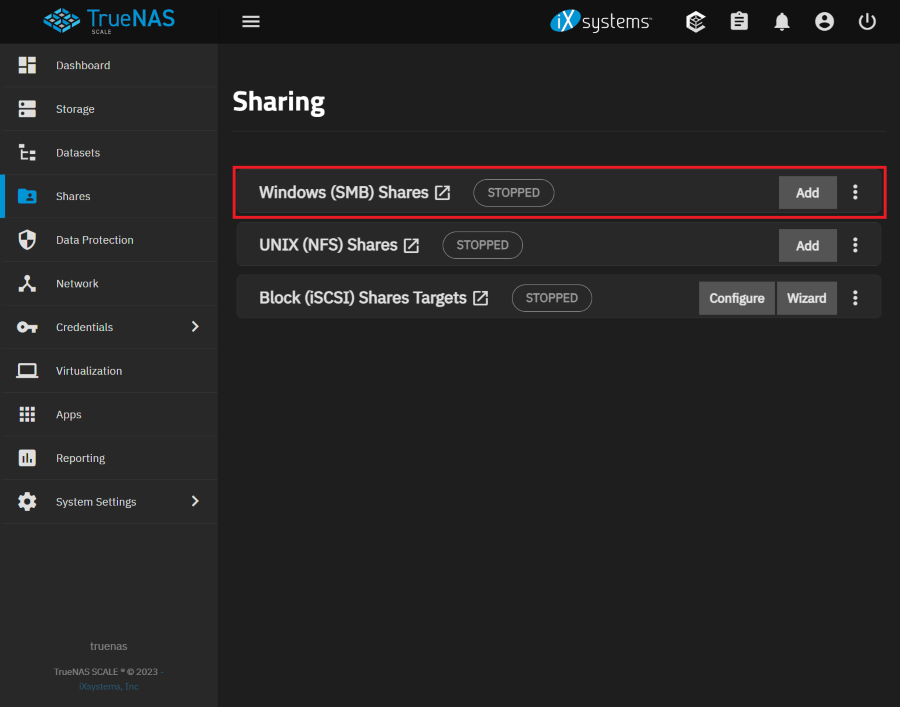
TrueNAS Scale の Sharing SMB の設定項目について確認する。
Reference
Environment
TrueNAS Scale 23.10.0.1
Add SMB
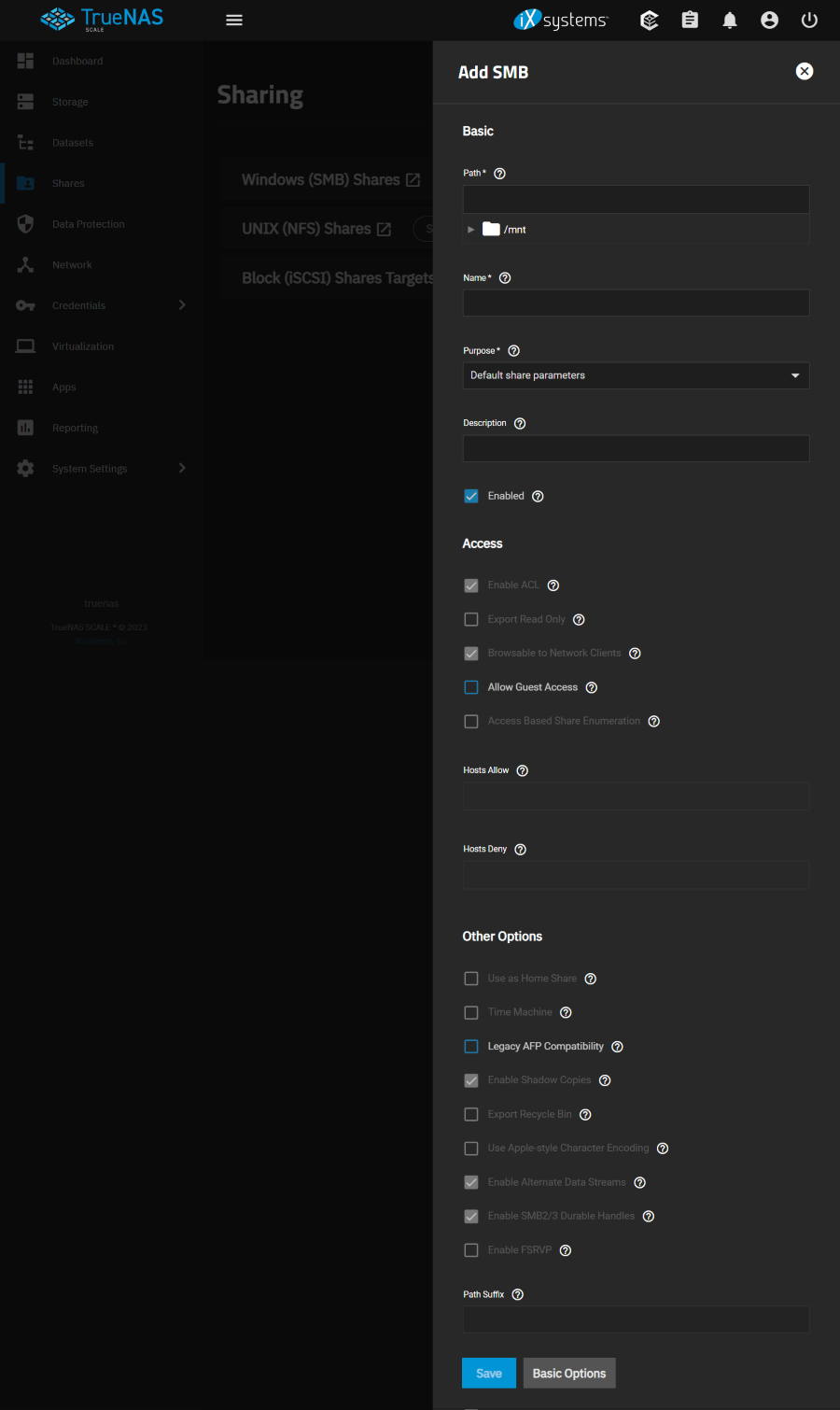
Basic
Path
Select pool, dataset, or directory to share.
Name
Enter a name for the share.
Purpose : Share の選択肢により下記に Access / Other Options の設定項目が選定される。
Select a preset configuration for the share. This applies predetermined values and disables changing some share options.
- No presents
- Default share parameters / default
- Basic time machine share
- Multi-user time machine
- Multi-protocol (NFSv4/SMB) shares
- Private SMB Datasets and shares
- SMB WORM. Files become readonly via SMB after 5 minutes
※特に要件がなければ「Default share parameters」を選択すればよい。
Description
Description of the share or notes on how it is used.
Enabled
Enable this SMB share. Unset to disable this SMB share without deleting it.
- Checked
Access
Enable ACL
Enable ACL support for the SMB share.
- Checked / default
Export Read Only
Prohibits writes to this share.
- Unchecked / default
Browsable to Network Clients
Determine whether this share name is included when browsing shares. Home shares are only visible to the owner regardless of this setting.
- Checked / default
Allow Guest Access
Privileges are the same as the guest account. Guest access is disabled by default in Windows 10 version 1709 and Windows Server version 1903. Additional client-side configuration is required to provide guest access to these clients.
MacOS clients: Attempting to connect as a user that does not exist in TrueNAS does not automatically connect as the guest account. The Connect As: Guest option must be specifically chosen in MacOS to log in as the guest account. See the Apple documentation for more details.
- Unchecked / default
Access Based Share Enumeration
Restrict share visibility to users with read or write access to the share. See the smb.conf manual page.
- Unchecked / default
Hosts Allow : 許可する
Enter a list of allowed hostnames or IP addresses. Separate entries by pressing Enter. A more detailed description with examples can be found here.
If neither *Hosts Allow* or *Hosts Deny* contains an entry, then SMB share access is allowed for any host.
If there is a *Hosts Allow* list but no *Hosts Deny* list, then only allow hosts on the *Hosts Allow* list.
If there is a *Hosts Deny* list but no *Hosts Allow* list, then allow all hosts that are not on the *Hosts Deny* list.
If there is both a *Hosts Allow* and *Hosts Deny* list, then allow all hosts that are on the *Hosts Allow* list.
If there is a host not on the *Hosts Allow* and not on the *Hosts Deny* list, then allow it.
Hosts Deny :
Allow and Deny Example
- Allow : no host / Deny : no host >> All Host Allow
- Allow : 192.168.1.1 / Deny : no list >> Allow only 192.168.1.1
- Allow : no list / Deny : 192.168.1.1 >> Deny 192.168.1.1 Allow except 192.168.1.1
- Allow : 192.168.1.1 / Deny : 192.168.1.1 >> Allow only 192.168.1.1
Other Options
Use as Home Share : ユーザーのホーム ディレクトリの利用可否
Allows the share to host user home directories. Each user is given a personal home directory when connecting to the share which is not accessible by other users. This allows for a personal, dynamic share. Only one share can be used as the home share.
- Unchecked / default
Time Machine :
Enable Time Machine backups on this share.
- Unchecked / default
Legacy AFP Compatibility :
This controls how the SMB share reads and writes data. Leave unset for the share to behave like a normal SMB share and set for the share to behave like the deprecated Apple Filing Protocol (AFP). This should only be set when this share originated as an AFP sharing configuration. This is not required for pure SMB shares or MacOS SMB clients.
- Unchecked / default
Enable Shadow Copies :
Export ZFS snapshots as Shadow Copies for VSS clients.
- Checked / default
Export Recycle Bin :
Files that are deleted from the same dataset are moved to the Recycle Bin and do not take any additional space. Deleting files over NFS will remove the files permanently . When the files are in a different dataset or a child dataset, they are copied to the dataset where the Recycle Bin is located. To prevent excessive space usage, files larger than 20 MiB are deleted rather than moved. This is not a replacement for ZFS snapshots.
- Unchecked / default
Use Apple-style Character Encoding :
By default, Samba uses a hashing algorithm for NTFS illegal characters. Enabling this option translates NTFS illegal characters to the Unicode private range.
- Unchecked / default
Enable Alternate Data Streams :
Allows multiple NTFS data streams. Disabling this option causes MacOS to write streams to files on the filesystem.
- Checked / default
Enable SMB2/3 Durable Handles :
Allow using open file handles that can withstand short disconnections. Support for POSIX byte-range locks in Samba is also disabled. This option is not recommended when configuring multi-protocol or local access to files.
- Checked / default
Enable FSRVP :
Enable support for the File Server Remote VSS Protocol (FSVRP). This protocol allows RPC clients to manage snapshots for a specific SMB share. The share path must be a dataset mountpoint. Snapshots have the prefix fss- followed by a snapshot creation timestamp. A snapshot must have this prefix for an RPC user to delete it.
- Unchecked / default